


Website Migration SEO: Complete Checklist & Strategy Guide
Website Migration SEO: Complete Checklist & Strategy Guide
What Is Website Migration and Why It Impacts SEO
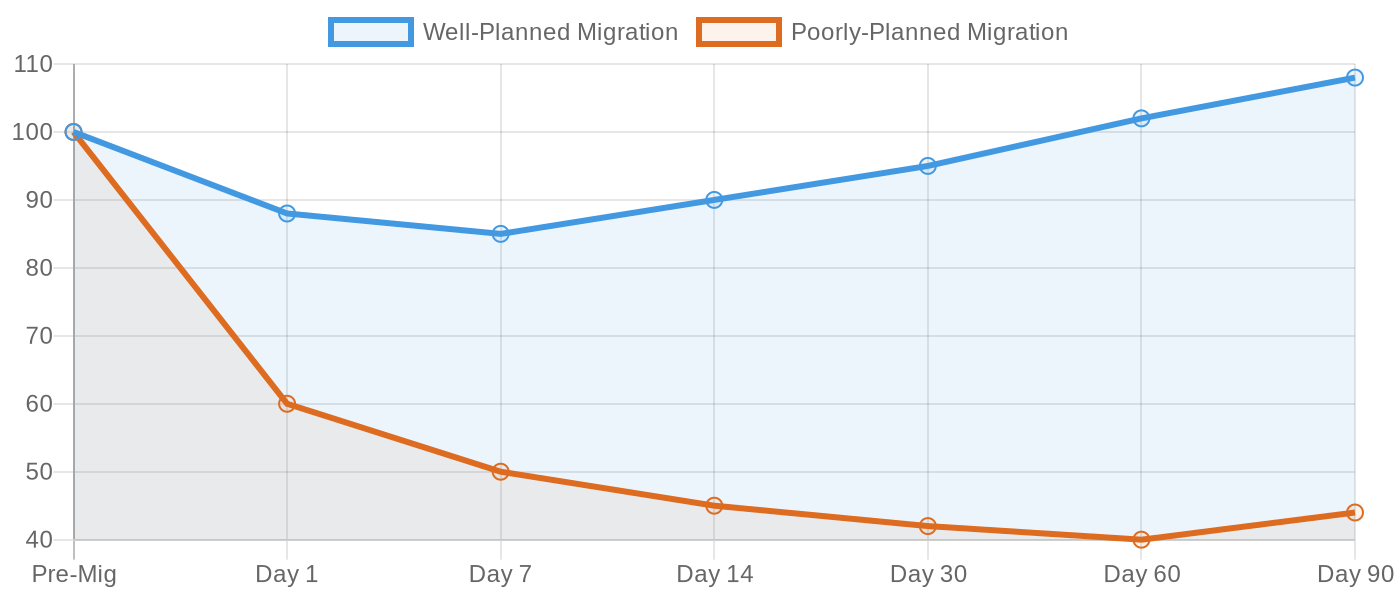
Website migration is any major change to a site that can affect search engine visibility: switching domains, replatforming, restructuring URLs, redesigning, or moving to HTTPS. Without a proper SEO migration strategy, even successful sites can lose 50% or more of their organic traffic. Recovery often takes months and rarely recovers to pre-migration levels without deliberate planning¹.
What Types of Website Migrations Affect SEO?
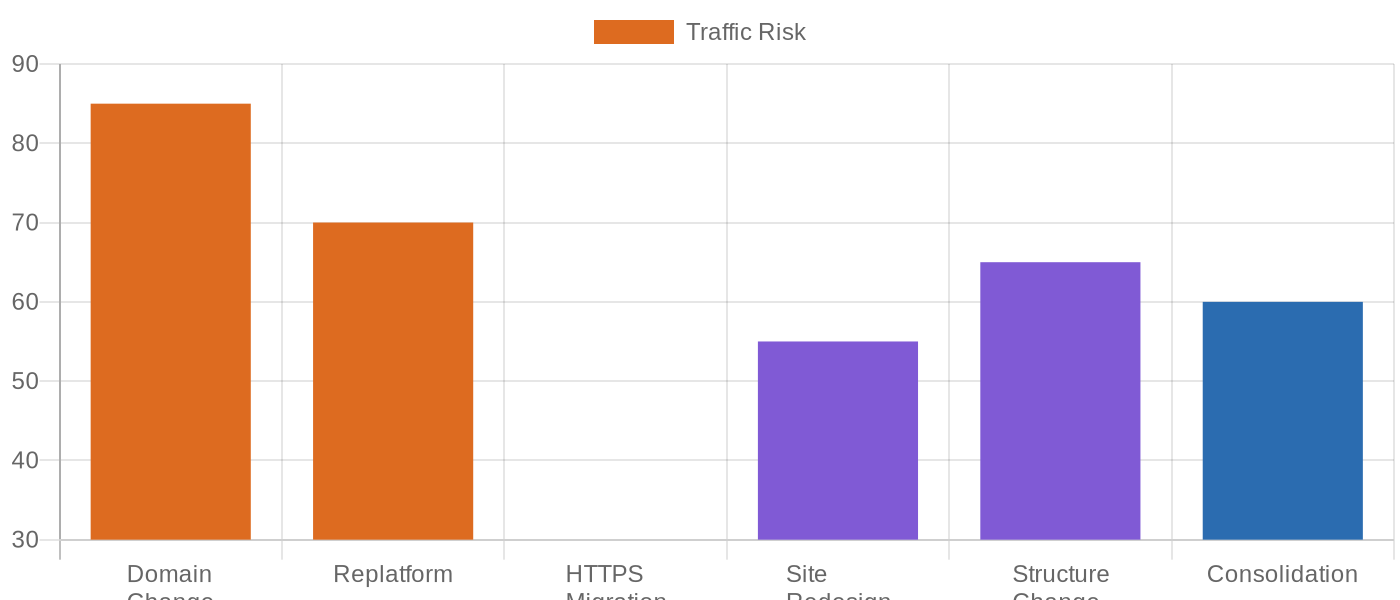
Each migration type carries different risk levels. Understanding your specific scenario determines which SEO safeguards to prioritize.
| Migration Type | Description | SEO Risk |
|---|---|---|
| Domain Change | Moving from oldsite.com to newsite.com | High |
| Replatforming | Switching CMS or ecommerce platform | High |
| Structure Change | Reorganizing navigation, categories, URL paths | Medium-High |
| Site Consolidation | Merging multiple sites into one | Medium-High |
| Site Redesign | Visual overhaul with content changes | Medium |
| HTTP to HTTPS | Adding SSL certificate for security | Low-Medium |
Domain changes and replatforming carry the highest risk because they fundamentally alter how search engines identify and evaluate your site. An ecommerce brand moving from a custom platform to Shopify or a SaaS company switching from WordPress to Webflow both need the full checklist applied¹.

Why Do Website Migrations Fail Without SEO Planning?
The root cause of most migration failures is treating it as a development project rather than an SEO project. Developers migrate databases and templates correctly. They may not know which pages drive 80% of organic revenue, which backlinks must be preserved, or which redirects need to happen. When those SEO assets are lost during the migration, the damage isn’t visible until weeks later when traffic data shows the drop¹.
Search engines treat a migrated site as essentially new until they recrawl and reevaluate every page. During this period, rankings fluctuate. Content that was previously trusted now needs to earn trust again. The objective of migration SEO is to give search engines everything they need to transfer authority—redirects, canonical URLs, sitemaps, and consistent content—so the evaluation period is as short and harmless as possible².
Website Migration Checklist for SEO
A structured checklist prevents the most expensive migration mistakes. The 12-step process below covers pre-migration preparation, launch-day execution, and post-launch monitoring. Every item that gets skipped creates a recovery task that takes longer and costs more than doing it right the first time³.
What Should You Do Before Starting a Migration?
The pre-migration phase determines whether the actual move succeeds or fails. Four foundational tasks must be completed before any code or content changes begin.
- Back up your existing site entirely — database, files, and analytics data. Create a staging environment where the new site can be tested without affecting live search visibility
- Export and annotate Google Analytics data — capture traffic, conversion rates, top landing pages, and keyword rankings. These become your recovery benchmarks
- Establish a communication plan — define who owns each checklist item, set content freeze periods, and align development, marketing, and SEO teams on timing
- Isolate the migration as a single change — resist the temptation to redesign, rewrite content, and change domains simultaneously. When multiple variables shift at once, diagnosing performance changes becomes impossible
How Do You Audit Existing Pages Before Migration?
Not every page deserves migration. Large sites often carry years of accumulated pages with near-zero traffic, outdated information, or duplicate content. Migrating everything indiscriminately transfers dead weight to the new site and wastes crawl budget on pages that never contributed to revenue¹.
Create a content inventory spreadsheet listing every URL alongside its organic traffic, keyword rankings, conversion rate, and backlinks. Identify pages worth migrating, pages to consolidate, and pages to remove with proper 301 redirects. Pay special attention to your top 20% of pages—these typically drive 80% of organic traffic and must be preserved exactly, from URL structure to meta data to internal linking².
What Is the Critical Role of 301 Redirects?
301 redirects are the single most important technical element of any migration. They tell search engines that a page has permanently moved, transferring most of its ranking authority and backlink equity to the new URL. Redirects must be one-to-one whenever possible: each old URL maps to precisely one new URL. Redirecting 100 product pages into a single category page dilutes authority and creates a poor user experience. Avoid redirect chains where URL A points to URL B which points to URL C; each additional hop leaks ranking authority².
Keep redirects active for a minimum of one year. Search engines need time to discover every redirect and process the authority transfer. During the first 180 days, Google runs an active signal transfer period where it actively migrates signals from old URLs to new ones. Removing redirects before this period completes severs the authority link. Update internal links throughout the new site to point directly to final URLs rather than relying on redirects for navigation¹.
Website Migrations: Technical Execution
Technical execution separates migrations that preserve rankings from those that destroy them. Three areas demand precise attention during the launch window³.
How Do You Handle Domain-Level Changes?
For domain migrations, submit a Change of Address in Google Search Console. This tells Google that your entire site has moved to a new domain and triggers an accelerated signal transfer. The tool only works for domain-level moves and not for partial migrations, HTTP to HTTPS transitions, or protocol-only changes. Submit XML sitemaps for both the old and new domains simultaneously. The old sitemap helps Google discover redirects; the new sitemap accelerates indexing of new URLs².
What Core Web Vitals Threats Does Migration Create?
Migration often involves changes to templates, scripts, hosting, and image delivery—all of which can degrade Core Web Vitals scores. A site that passes performance thresholds before migration may fail afterward because a new platform renders differently, loads different JavaScript bundles, or serves images through different CDNs. Run PageSpeed Insights on the staging environment before launch and compare against pre-migration benchmarks³.
| Metric | Target | Common Migration Threat |
|---|---|---|
| LCP (Largest Contentful Paint) | ≤ 2.5 seconds | New theme loads hero images slower |
| INP (Interaction to Next Paint) | ≤ 200 ms | New platform adds heavier JS bundles |
| CLS (Cumulative Layout Shift) | ≤ 0.1 | New templates cause content reflow during load |
If Core Web Vitals scores drop significantly after migration, search engines interpret the decline as a quality signal reduction, compounding the ranking volatility that migration already creates. Fix performance issues before launch or immediately after¹.
How Do You Manage Duplicate Content Risk?
Migration creates duplicate content risk through HTTP/HTTPS variants, staging environments going live accidentally, and international site versions with overlapping language targets. Canonical tags signal to search engines which URL is the authoritative version when multiple URLs contain identical or near-identical content. Set canonicals correctly on every page. For international sites, hreflang tags prevent duplicate content penalties by telling search engines that the US English and UK English versions of a page serve different legitimate audiences².
Ensure the staging environment includes no-index tags. If the staging site removes its password protection, even temporarily, search engines may index both versions and split authority between them. Once duplicate content is indexed, cleaning it up requires re-crawling and re-evaluation—a process that adds weeks to migration recovery³.
Post-Migration Monitoring and Recovery
The first weeks after migration determine whether you stabilize quickly or lose months to emergency fixes. A disciplined monitoring protocol catches problems before they compound into ranking collapses¹.
What Should You Monitor Immediately After Launch?
- Google Search Console indexing report — check daily for the first two weeks. Look for unexpected 404 errors, pages not being indexed, and sitemap processing errors
- Organic traffic by landing page — compare daily traffic against pre-migration benchmarks. A 10-15% dip in week one is normal as Google recrawls. Anything beyond 30% requires investigation
- 404 error logs — use Screaming Frog or similar crawlers to scan the new site for broken internal links, missing redirects, and orphan pages that should have been redirected
- Google Analytics real-time reports — verify that tracking fires correctly, conversion events register, and no pages show zero traffic when they should be receiving visitors
How Long Does SEO Recovery Take After Migration?
Recovery timing depends on migration quality, site size, and crawl frequency. Well-executed migrations on smaller sites may recover to pre-migration traffic levels within two to four weeks. Large ecommerce sites with tens of thousands of URLs typically need four to eight weeks. Enterprise sites that changed platforms or domains should budget eight to twelve weeks before declaring the migration stable. During this period, avoid launching additional SEO initiatives—let the migration settle before introducing new variables¹.
A temporary dip is normal and expected. Google acknowledges that ranking fluctuations occur during migration. The key indicator is direction: if rankings and traffic trend upward after the initial post-launch dip, the migration is working. If they continue declining after two weeks, investigate redirects, canonicals, and indexation status before the gap becomes irreversible².
Site Migration Strategy for Global Brands
For brands managing multi-country websites, migration complexity multiplies. Each country version requires independent redirect mapping, hreflang validation, and performance monitoring. A migration on one country site can cascade into ranking losses on others if shared infrastructure or URL patterns are affected².
How Do International Sites Handle Migration Differently?
International sites add hreflang tags and country-specific URL structures to the migration checklist. When migrating a multi-language site, verify that hreflang tags on the new site correctly reference all language and country variants. A missing or broken hreflang tag creates two problems: search engines may serve the wrong language version to users, and they may treat the different country versions as duplicate content rather than legitimate regional variants. Both outcomes reduce rankings across every affected market².
For brands simultaneously migrating multiple country sites, staging each market independently reduces risk. Complete the migration for one country, monitor for two to four weeks to confirm stability, then apply learnings to the next market. This phased approach prevents a single migration mistake from affecting all markets simultaneously. Each completed migration provides a template that accelerates subsequent country deployments¹.
How Does Migration Impact AI Search Visibility?
Migration now affects more than traditional search rankings. AI systems like Google AI Overviews, ChatGPT, and Perplexity cite content they have indexed and evaluated over time. When a migration removes or moves previously cited content, the brand’s AI visibility drops regardless of whether traditional rankings are preserved through redirects. To maintain AI search presence, preserve the content pages most frequently cited in AI-generated answers, maintain schema markup that AI systems use for entity recognition, and monitor how brand mentions change in AI responses after migration³.
HUITONGJIADA’s Independent Website Optimization service covers the full migration lifecycle—pre-migration audit and planning, redirect mapping across thousands of URLs, Core Web Vitals optimization for the new platform, hreflang configuration for international sites, and post-migration monitoring with weekly performance reports. For brands managing complex migrations across 100+ countries without a dedicated technical SEO team, having an operational partner turns migration from a ranking threat into a performance upgrade.
Common Website Migration Mistakes to Avoid
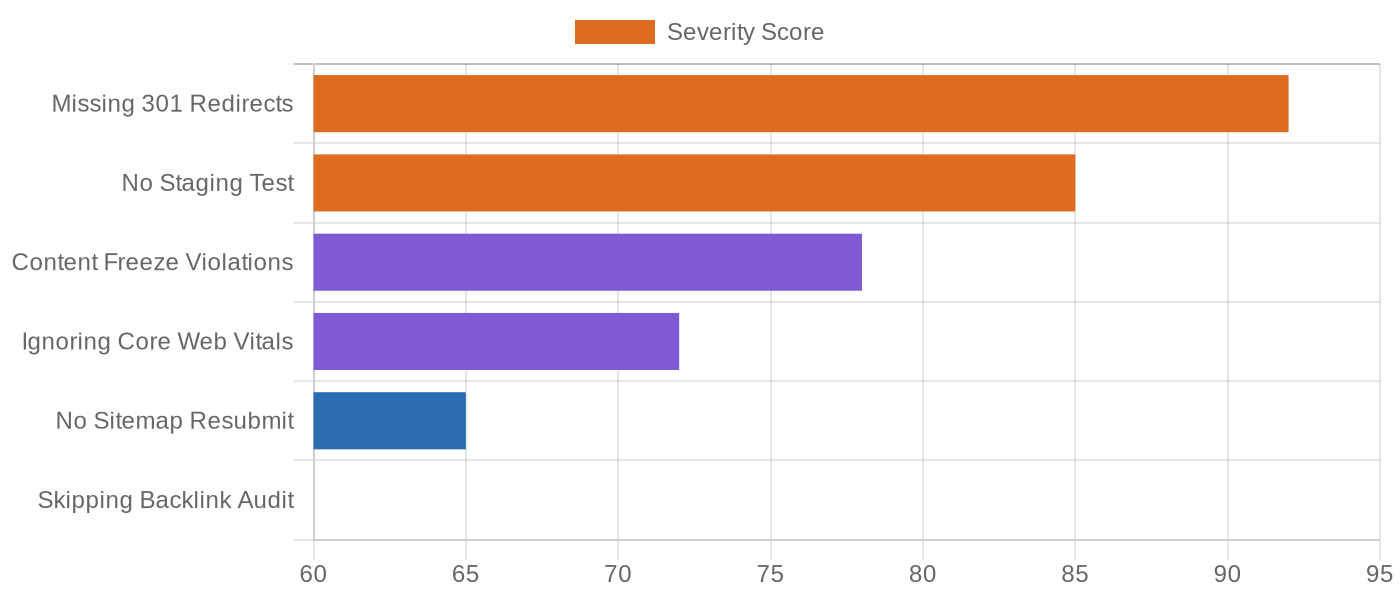
The same migration mistakes repeat across companies and industries because they all trace back to a single root cause: treating migration as a development task rather than an SEO operation. Development completes when the site loads. SEO completes when traffic recovers. Those are different timelines with different checklists¹.
Which Migration Errors Cause the Most SEO Damage?
Missing 301 redirects is the costliest single error. Without redirects, every old URL returns a 404, and search engines discard the ranking authority, backlink equity, and user trust accumulated over years. A site that had 5,000 pages driving organic traffic can lose 80% of that traffic within weeks if redirects are absent or configured incorrectly. Recovering from this requires rebuilding authority from scratch—a process measured in months, not days².
Making multiple simultaneous changes ranks second for damage potential. When a brand replatforms, redesigns, rewrites content, and changes domain structure simultaneously, no one knows which change caused the traffic decline. Was it the new platform’s URL format? The rewritten product descriptions? The missing internal links in the new design? Each variable must be isolated and tested, which slows recovery to a crawl. Change one thing at a time. Establish a benchmark. Then change the next thing¹.
Skipping staging environment testing ranks third. Every redirect, every canonical tag, every hreflang configuration should be tested on staging before the live site sees a single change. Crawl the staging site with Screaming Frog or similar tools to verify that redirects work, canonicals point to correct URLs, and no unexpected 404s exist. The hour spent crawling staging prevents days of emergency fixes on live³.
Your Website Migration SEO Strategy
Website migration is one of the highest-stakes operations in SEO. Done right, it preserves rankings and can improve performance through better infrastructure. Done wrong, it destroys years of organic investment in weeks. The 12-step checklist—backup, communication plan, isolation, audit, redirects, 404 tracking, change of address, canonical URLs, Core Web Vitals, sitemap submission, analytics verification, and ongoing monitoring—provides the structure that turns migration from a ranking threat into a controlled transition¹.
Recovery expectations matter. A 10-15% temporary dip is normal. A decline that exceeds 30% and persists past two weeks signals a problem requiring investigation. Monitor Google Search Console indexing reports daily during the first two weeks, compare landing page traffic against pre-migration benchmarks weekly for the first two months, and keep redirects active for at least one year. The brand that plans migration as an SEO operation rather than a development task keeps its rankings. The brand that doesn’t starts over².
Ready to plan a migration that protects your rankings and improves your site performance? Get in touch with HUITONGJIADA to discuss how our technical SEO team can guide your migration from audit through recovery—across a single market or 100+ countries.
1. SEO migration 2026: the complete guide — velox media
2. SEO site migration checklist 2026: 12 steps to protect rankings — shopify
3. SEO migration strategy: a complete guide for 2026 — influize
4. The website migration guide: SEO strategy, process, and checklist — moz